Give your Codex a skin you actually want to look at
Community skins for the OpenAI Codex desktop app — browse the gallery, copy one prompt, and let Codex reskin itself. Fully reversible.

Skin gallery


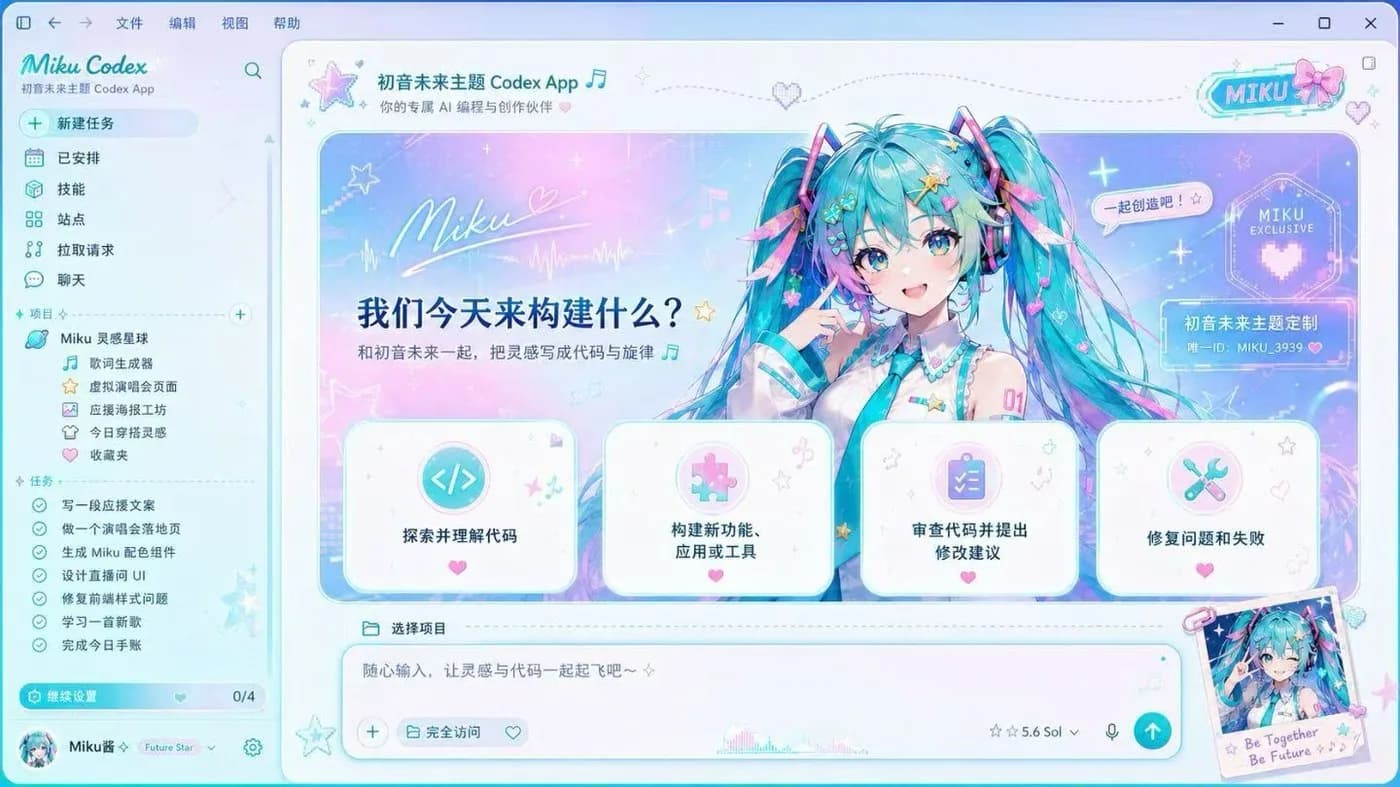



What is a Codex skin?
The OpenAI Codex desktop app ships with one plain look. A Codex skin replaces it with a full-image theme — artwork behind the whole workspace, restyled panels, a matching colour scheme — while every feature stays exactly where it was. Nothing in the sidebar, project tree, task list or diff view moves or disappears.
The skins here come from Codex Dream Skin, an open-source project that restyles the desktop app at runtime over the Chrome DevTools Protocol on your own machine. It does not repackage the app, patch the installer or touch its signature, which is why the change is completely reversible: one command brings the stock interface back. It works on both macOS and Windows.
Skinning is not the same thing as the colour themes Codex already has. If you only want a different palette or font, the built-in theme system and its shareable theme strings cover that. A skin is for people who want the whole workspace to look like something — a character, a stage, a colour world — rather than just a different accent.
Skins vs. Codex built-in themes
Built-in Codex themes
Codex has its own theme system: colour schemes, fonts, and importable theme strings you can paste to share a palette with someone. Official, safe by definition, and unaffected by updates. It cannot put artwork behind your workspace.
Dream Skin full-image skins
A skin puts real artwork behind the entire workspace. It is a third-party tool, it can break when Codex changes its interface, and it can be undone at any time. Everything in this gallery is this kind.
How it works
- 01
Browse the gallery and open the skin you want. Every entry shows what it actually looks like before you install anything.
- 02
Copy that skin’s install prompt and paste it into Codex — it reads the upstream repository and installs the skin itself. Prefer doing it by hand? Follow the macOS or Windows guide.
- 03
Check the result. If Codex updates and the skin breaks, or you just want the plain interface back, one command restores it.
Quick answers
- Is Codex Dream Skin safe?
- The skin tool uses localhost CDP injection to modify the UI at runtime, without touching the official app bundle or its signature. The upstream project is open source and auditable. That said, it remains a third-party tool—avoid running untrusted local programs while the skin is active, and review the code if security is a concern.
- Will it touch my API keys or model settings?
- No. Skinning operates entirely at the visual layer and is independent of API configuration. The upstream maintainer has explicitly committed not to read or write API keys, base URLs, or model settings. Your credentials remain untouched.
- How do I restore the original look?
- The upstream tool provides a built-in one-click restore entry. After restoration, the app will look identical to a fresh official install with no residual changes.