Hatsune Miku
Official concept art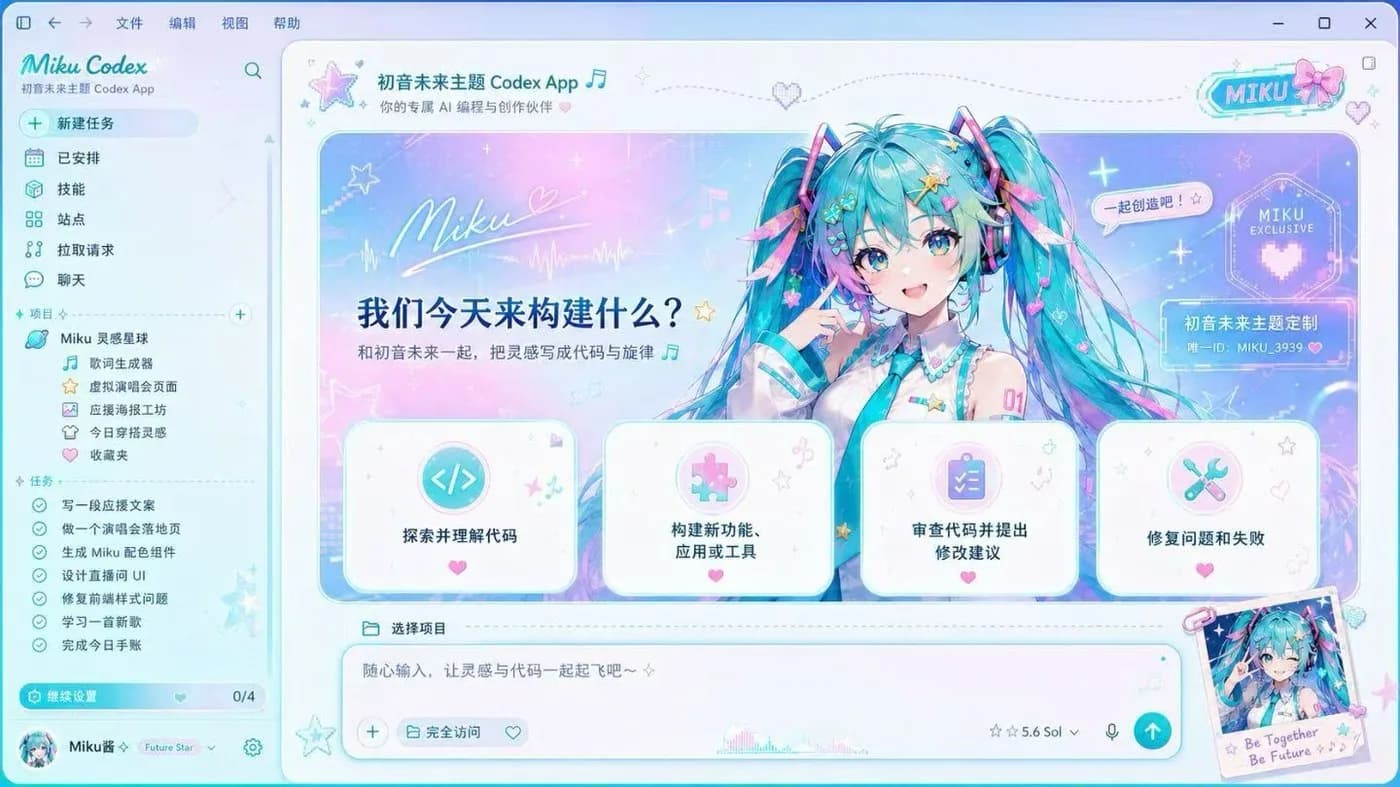
Preview image source: Fei-Away/Codex-Dream-Skin (official concept art).
Character artwork shown for theme illustration only. Hatsune Miku and related rights belong to their respective owners. Confirm licensing before any commercial use or redistribution.
The Hatsune Miku Codex skin is the one people search for by name. It wraps the OpenAI Codex desktop app in her signature teal: a pastel stage-light gradient behind the workspace, Miku herself beside the hero panel, star and music-note details throughout, and a sidebar retitled Miku Codex. The project tree is themed around a lyric generator and a virtual concert page instead of ordinary folders.
Despite how much is going on, it is one of the more workable anime Codex skins: panels stay light and high-contrast, so code, sidebar and tasks remain perfectly readable, and nothing in the Codex interface is moved.
It comes from the open-source Codex Dream Skin project, installs on macOS and Windows, and is free. Paste the install prompt below into Codex and it will fetch the upstream repository and apply the theme itself, or follow the manual install guide if you would rather go step by step. The stock look is one command away.
Install with one prompt
Paste this into Codex and it will install the skin itself (agent-native install):
Read the repository https://github.com/Fei-Away/Codex-Dream-Skin and install Codex Dream Skin on this machine with the "Hatsune Miku" style theme. Follow the platform folder (macos/ or windows/) instructions, verify the skin is active, then tell me how to restore the stock look.